
Protect Your WordPress Using Claude Code and Karna


When we open-sourced Karna WAF, we immediately added AI Agent Skills to help agents not just use and configure Karna, but also learn how to protect web apps and APIs. Now you can ask to Claude Code to protect your web application using Karna without knowing how to do it yourself.
Karna Skills are grouped in 4 different categories:
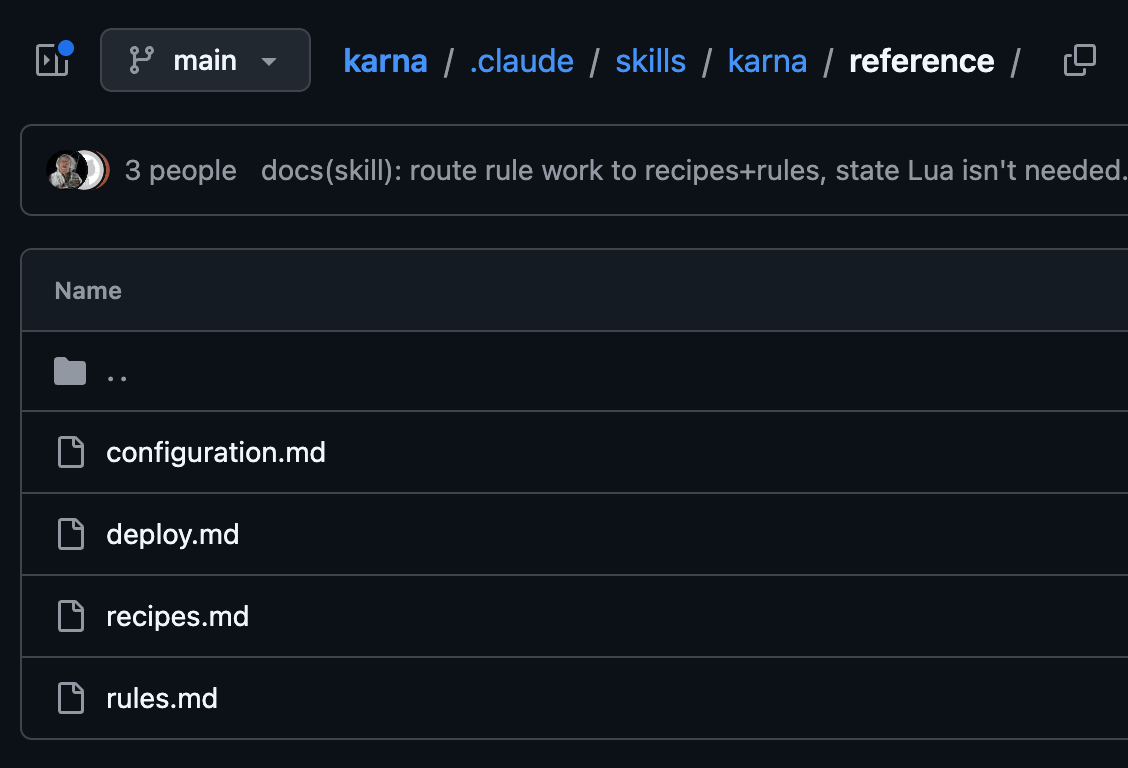
configuration: tells to your AI Agent how to configure Karna and what each parameter means.
deploy: instruction about how to deploy Karna via an isolated docker container or into an existing Kong Gateway
recipes: here you'll find the most interesting information for protecting your application. It contains instruction like "Block a specific attack on one parameter" or "Sanitize instead of block", etc...
rules: simply how the rule engine works and how to creat a rule
Let's see it in action
Here is the whole demo in three moves. I point a brute-force tool at a WordPress login and it finds the admin password, because the password is weak and nothing is stopping it. Then I open Claude Code and ask, in plain English, to make Karna rate-limit and auto-ban failed logins. Claude writes the rules, applies them to the running gateway through the Kong Admin API, and flips the WAF into blocking mode. I run the exact same attack again and it dies on a wall of 429 Too Many Requests. No code deploy, no plugin restart, no hand-written config. Just a described outcome and a WAF that now enforces it.
This post is the long version of what happens in that clip.
Why a signature WAF does not stop brute force
A WAF is very good at looking at one request and deciding whether it is an attack. A UNION SELECT, a <script> tag, a path traversal: these live inside a single request and a pattern catches them.
A login attempt is different. A single POST to wp-login.php with a username and a password is indistinguishable from a real person signing in. There is no payload to match, no metacharacter to flag. The tell is not in any one request, it is in the rate and the outcome of many: fifty POSTs in ten seconds from one address, all failing, is probably a brute-force attack attempt.
To catch that you need "state" across requests. A stateless per-request rule engine does not have it by default. Karna gets it from Redis, and exposes it as ordinary rule actions and operators, so "lock this source out after N failed logins" becomes a rule you write in the same JSON language as any detection rule. That is the base this whole post builds on.
An example of a Karna rate limit rule is:
{
    "id": "wp-login-ratelimit",
    "phase": "access",
    "conditions": [
        {
            "op": "eq",
            "value": "POST",
            "variables": ["request.method"]
        },
        {
            "op": "beginsWith",
            "value": "/wp-login.php",
            "variables": ["request.raw_path"]
        }
    ],
    "action": {
        "rate_limit": {
            "key": "%{remote_addr}",
            "limit": 10,
            "window_seconds": 60,
            "response": {
                "status_code": 429,
                "body": "Too many login attempts, slow down.\r\n"
            }
        }
    },
    "message": "wp-login rate limit",
    "tags": ["ratelimit", "auth"],
    "log": true
}
Move one: the attack
The target is a vanilla WordPress behind Karna, with the WAF running in detection-only mode (engine_blocking_mode: false). CRS is loaded and the WordPress rule-exclusions plugin is active, but out of the box CRS does not block login attempts, because, as we just said, a login POST is not an attack per se.
The tool in the video is wpscan, the standard WordPress auditing scanner. It enumerates users first (WordPress leaks valid usernames through author archives and the REST API unless you lock that down), confirms admin exists, then throws a password list at wp-login.php:
wpscan --url http://target --usernames admin \
       --passwords /usr/share/wordlists/rockyou.txt
The seeded password is deliberately weak, so within seconds wpscan prints the line nobody wants to see on their own site:
[+] Valid Combinations Found:
    | Username: admin, Password: password
The audit log records a burst of login POSTs, but nothing is stopped. This is the baseline: a working, successful brute force.
One detail here matters more than it looks, and it is the key to everything that follows. WordPress does not answer a failed login with 401 Unauthorized the way a well-behaved API would. It re-renders the login form and returns 200 OK. A successful login returns 302 Found with a redirect and a wordpress_logged_in cookie. So the failure signal is inverted from what most rate-limit recipes assume: the thing you want to count is a POST that comes back 200, not a 401.
Move two: asking Claude Code to fix it
Now I switch to Claude Code, in a terminal sitting in the Karna checkout, and type something close to:
Configure Karna to rate-limit and auto-ban brute-force attempts against the WordPress login, then switch it to blocking mode.
Karna ships an agent skill (.claude/skills/karna/). When a request mentions deploying, configuring, or writing rules for Karna, Claude loads it. The skills are the distilled operational knowledge of how to actually write correct rules, split across reference/recipes.md (worked patterns) and reference/rules.md (the shared mechanics: phases, evaluation order, variables, operators, actions). The skill is explicit that you do not need to read the Lua engine source to author rules, everything required is in those two files, and that keeps Claude fast and grounded instead of spelunking through ka_engine.lua on every request (saving tokens).
Move three: the rules Claude writes
The pattern has two rules that work as a pair, plus a config prerequisite.
The prerequisite: Redis (or Valkey) has to be connected (redis_host / redis_port in the plugin config), and redis_inspect_enabled has to be true, because reading a counter back inside a condition is off by default. The terminal block only fires once the WAF is in blocking mode.
The first rule counts failures. It has to run in the response phase, because the failure only exists in the response (that inverted 200). The counting rule keys on a POST to wp-login.php that comes back 200, and increments a per-source counter with a fixed 15-minute window:
{
  "id": "wp-authfail-count",
  "phase": "header_filter",
  "conditions": [
    {
      "op": "eq",
      "value": "POST",
      "variables": ["request.method"]
    },
    {
      "op": "beginsWith",
      "value": "/wp-login.php",
      "variables": ["request.raw_path"]
    },
    {
      "op": "eq",
      "value": "200",
      "variables": ["response.status"]
    }
  ],
  "action": {
    "redis_incr_key": {
      "key": "authfail:%{remote_addr}",
      "expire": 900
    }
  },
  "message": "wordpress failed login",
  "tags": ["auth","bruteforce","wordpress"]
}
redis_incr_key needs both key and expire. The TTL is set on the first failure and not refreshed, so the counter is a true fixed window: it resets 900 seconds after the first failure in a run, not after the last. The %{remote_addr} macro resolves to the client address, so the counter is per source.
The second rule does the blocking. It runs in the access phase, before the request ever reaches WordPress, and it checks the counter that the first rule has been building. Once a source is over the threshold, every further login attempt gets a 429 with a Retry-After header instead of being proxied:
{
  "id": "wp-authfail-block",
  "phase": "access",
  "conditions": [
    {
      "op": "beginsWith",
      "value": "/wp-login.php",
      "variables": ["request.raw_path"]
    },
    {
      "op": "gt",
      "value": "5",
      "variables": ["redis.authfail:%{remote_addr}"]
    }
  ],
  "action": {
    "fixed_response": {
      "status_code": 429,
      "body": "Too many failed attempts.\r\n",
      "headers": {
        "Retry-After": "900"
      }
    }
  },
  "message": "wordpress brute-force throttled",
  "tags": ["auth","bruteforce","wordpress","ban"]
}
Read the loop end to end. Attempts one through five reach WordPress, fail, come back 200, and each failure bumps authfail:<ip> in Redis. On attempt six, the access-phase rule reads the counter, sees it above five, and answers 429 itself. WordPress never sees attempt six or anything after it, from any gateway node, until the counter expires. A real user who mistypes twice never gets near the threshold, and a successful login returns 302, so it never increments the counter at all.
Claude applies both rules to the rules_request array through the Kong Admin API (a PATCH to the plugin config), flips engine_blocking_mode to true, and it is live. No restart, because the config is read per request.
The ordering matters
When you combine several of these rules in the access phase, order matters, because access-phase rules run in array order and a terminal action stops the phase. The rule that says "this source is already banned, block it" has to come first. It is the most general terminal check, so once an IP is banned it short-circuits everything else and never touches the backend. After that comes the threshold check. And any broad rate_limit rule goes last, because a rate_limit on the login path is itself terminal and matches every login request, so if you put it first it ends the phase and your ban rules never run.
The counting rule does not compete for this ordering, because it lives in the response phase (header_filter), which is a separate pass. This is exactly the kind of cross-cutting mechanic that rules.md documents and that a first-timer gets wrong. The skill encodes it so Claude places the rules in the right order without being told.
Move three, continued: watching it fail
Back in the video, blocking mode is on and the rules are live. I re-run the identical wpscan command. The first few guesses go through and fail as before, the counter climbs in Redis, and then wpscan hits the wall:
429 Too Many Requests
429 Too Many Requests
429 Too Many Requests
...
You can watch it happen from three angles. The counter in Redis climbing (redis-cli get authfail:<ip>), the Karna audit log flipping from silent to a stream of wp-authfail-block matches, and wpscan itself grinding to a halt because every request now comes back 429 before WordPress is ever consulted. The password is never found, because the attack never gets enough attempts to find it.
Turning a throttle into a real ban
The rule above throttles: while you are over the threshold you get 429, and when the window expires you are let back in. For an attacker who backs off and returns, you probably want a ban that outlives the counting window. Swap the block action for a redis_set that writes a ban key with a longer TTL:
...
"action": {
  "redis_set": {
    "key": "ban:%{remote_addr}",
    "expire": 3600
  }
}
Then add one general rule at the very top of the access phase that blocks anything on the ban list, for every path, not just the login:
{
  "id": "block-banned",
  "phase": "access",
  "conditions": [
    {
      "op": "isSet",
      "value": "",
      "variables": ["redis.ban:%{remote_addr}"]
    }
  ],
  "action": {
    "fixed_response": {
      "status_code": 403,
      "body": "Forbidden\r\n"
    }
  },
  "message": "source is banned",
  "tags": ["banlist"]
}
Now a bruteforce attacks that hit the threshold is banned from the entire site for an hour, not just slowed down on the login page, and Redis expires the ban on its own with no cron job to maintain. Because the ban state lives in Redis and not in per-worker memory, a ban written by one Kong node is instantly visible to every node in front of the same site. That is what makes this viable on a real multi-node gateway rather than a single-process demo.
The same block-banned plus redis_set shape composes with detection rules too. A rule that catches SQL injection can redis_set a ban the moment it fires, and from then on that source is gone site-wide, without re-running the expensive detection on every subsequent request. Brute force and injection end up feeding one shared ban list.
Try it yourself
Ask Claude to protect your website using Karna, he'll know how to do it 😄.
References
- Karna docs: rule actions (
rate_limit,redis_*), operators,response.*variables, evaluation order - Karna source and the agent skill:
.claude/skills/karna/(recipes and rules references), the Redis path inhandler.lua, Redis actions and operators inmodules/ka_engine.lua - WPScan, the WordPress security scanner used in the demo